
Exploring in a visual mode#
Most learning material arrives as printed text. That’s fine, but text is only one way to hold an idea in your head. When you also see the idea — as a diagram, a map, a sketch — you give yourself a second handle on it. This isn’t a trick for “visual people” — and matching study to a supposed “visual style” isn’t the lever it was sold as (what the evidence really says about learning styles ). Drawing the idea works for everyone, and there’s a solid reason why.
Your mind processes words and pictures through two partly separate systems: a verbal channel for language and a visual channel for imagery. Encode an idea in both and you build two routes back to it, which is why people consistently learn more deeply from words and pictures than from words alone. Allan Paivio called this dual coding; Richard Mayer’s research on multimedia learning has spent decades confirming it in classrooms and on screens. So when you turn a paragraph into a picture, you’re not indulging a style preference — you’re using a second channel that was sitting idle.
Visual exploration is simply the habit of doing that on purpose. Here are the main ways.
Diagrams, graphs and sketches#
If you can find a good diagram, graph or sketch that captures the key message of a topic, use it. If you can’t, draw your own — and don’t let “I can’t draw” stop you. The point isn’t a pretty picture; it’s the act of deciding what goes where, what connects to what, and what to leave out. That decision is the understanding. A rough box-and-arrow sketch you made yourself will teach you more than a polished diagram you only glanced at.
Spreadsheets make this even easier for anything numeric. Drop your data in, generate a chart, and a trend that was invisible in a column of figures often jumps straight out at you.
One caution worth keeping in mind: a visual helps when it carries information — structure, a process, how things relate in space. A picture added purely for decoration doesn’t help, and can actually pull attention away from the point. So when you make or choose a visual, ask what it’s explaining. If the answer is “nothing, it just looks nice”, leave it out.
Mind maps#
Mind maps organise topics and ideas as a branching drawing — a central theme in the middle, with sub-topics radiating out. They’re a quick way to see the hierarchy of a subject and the links between its parts, and to spot a gap where a branch feels thin. Tony Buzan popularised the technique and describes it at length in several of his books.
You can mind-map on paper, which is fastest for thinking on the fly, or with software that lets you reshuffle branches without redrawing the whole thing — a whiteboard app or a dedicated mapper both work; the Concept and Mind Mapping course runs through the current tools. Rather than describe the format in words, I’ll let the map below do it.

A small caveat: the value here is the making of the map, not the map as a finished object. Building it forces you to organise the material; a beautiful map you didn’t think hard about won’t do much for you. The strongest version is to build the map, then redraw it from memory and check what you missed — that turns it into retrieval practice . For the full range of map types beyond mind maps, see the Concept and Mind Mapping course .
Systems diagrams#
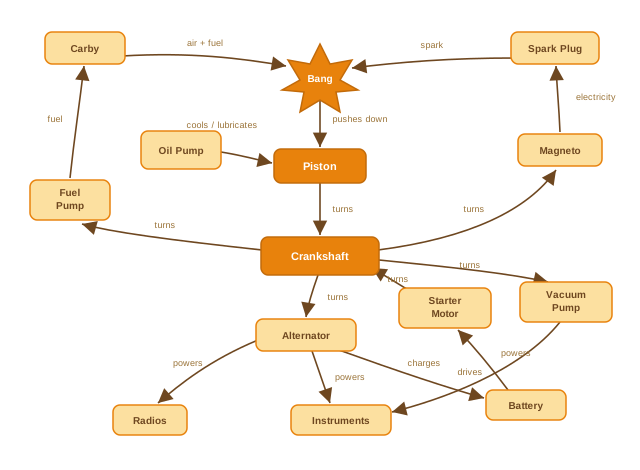
Systems diagrams help you understand something dynamic — an engine, a body, a yacht, a network. The usual way to make sense of a complex thing is to take it apart and study each piece. But for a system, that often makes things harder, because the behaviour lives in how the parts interact, not in the parts themselves.
It’s difficult to understand the human body by looking at organs one at a time. It’s difficult to understand how a yacht holds its balance under full sail by examining the sail, rudder, keel and hull separately. The linkages between the parts are what make the whole thing work — and those linkages disappear when the system is lying in bits on the floor, or scattered across separate topics in your notes.
A systems diagram puts the linkages back. It shows the parts and the arrows between them, so you can follow how a change in one place ripples through the rest. The diagram below shows how the various parts of an aircraft engine work together.
When you draw one yourself, keep related parts and their labels close together. Forcing your eye to jump back and forth between a far-off label and the thing it describes just wastes working memory that should be going on the idea.
Visualization#
Finally, you can run the picture in your head. Use the visualization techniques from the Memletic Techniques section to picture a topic clearly and precisely. This doubles nicely as a self-check: if you can build a sharp mental image of how something works, you probably understand it. If parts of the picture come out grey or fuzzy, that fuzziness is useful feedback — it’s pointing straight at the bits you still need to work on.
The takeaway#
Visual exploration isn’t reserved for a “visual type”. It’s a general tool, available to every learner, that puts your idle visual channel to work alongside the verbal one. Turn the page into a diagram, the subject into a map, the system into arrows — and as you do, ask the one question that keeps it grounded: what is this picture explaining? If it’s carrying real information, you’ll understand the topic better for having drawn it.