
Concept mapping in the AI age#
This course was first written in 2005. The ideas in it — laying concepts out and naming the links between them — are older still. None of that has aged, because it describes how you make sense of a topic, and that hasn’t changed. The tools, though, have changed almost beyond recognition. You can now ask a machine to draft a map from your notes, keep your whole note collection as a single linked graph, or write a diagram as a few lines of text and have it drawn for you.
This page is a tour of what’s new, written with the same discipline as the rest of the manual. For each capability the honest question is the same one we ask of every technique: does it make me do the learning, or does it do the learning for me? A tool that helps you select, organize and connect is earning its keep. A tool that hands you a finished artefact you didn’t build has saved you time and taught you nothing. Most of what follows is best described as an enabling capability — it removes friction — rather than a proven learning gain. Where the evidence supports a real benefit, it’s the same old benefit: you did the work.
AI-assisted mapping#
A large language model can now read your raw notes and draft a concept map from them — concepts pulled out, links proposed, the whole thing laid out in seconds. It can also restructure a map you already have as your understanding shifts, or suggest links you missed. For getting a first version onto the page, that’s genuinely useful, and it lowers the activation energy of starting.
Treat it as an enabling capability, not a proven learning gain, and hold two cautions firmly.
First, you must check it. Models invent links that sound plausible and aren’t true — a confident arrow labelled “causes” between two things that merely co-occur. An AI draft is a hypothesis to verify against your source, never a finished map to trust. The checking is not overhead; it’s part of the learning.
Second, and more important: the learning still comes from you doing the work. The benefit of mapping was never the picture — it was the act of deciding what matters, how the pieces relate, and where they connect to what you already know. An AI that maps for you performs exactly the mental work that would have built your understanding, and leaves you holding a tidy diagram you can’t reproduce. As the manual puts it elsewhere: use AI to find and clarify, then do the learning yourself. A good workflow looks like ask the model to draft → check every link against the source → rebuild the map from memory. The draft saves typing; the rebuilding is where you actually learn.
For the fuller version of this argument — the line between the tool that helps you think and the tool that thinks for you — see Learning with AI .
Knowledge graphs versus concept maps#
You’ll increasingly hear the term knowledge graph, and it’s worth knowing how it relates to what this course teaches, because the two are easy to confuse and serve opposite purposes.
They share the same DNA: nodes joined by labelled edges. This is the through-line of the whole course — a concept map and a knowledge graph are the same primitive, a labelled graph, just built at different scales. The difference is scale and who it’s for.
- A concept map is human sense-making. A few dozen labelled relationships you built by hand to understand a topic. It’s small on purpose — small enough to hold in your head and reason about. You are the point.
- A knowledge graph is machine sense-making. Millions of (subject — predicate — object) triples a computer stores and queries — the structure behind search engines and AI assistants. Scale is the point. No human reads one whole.
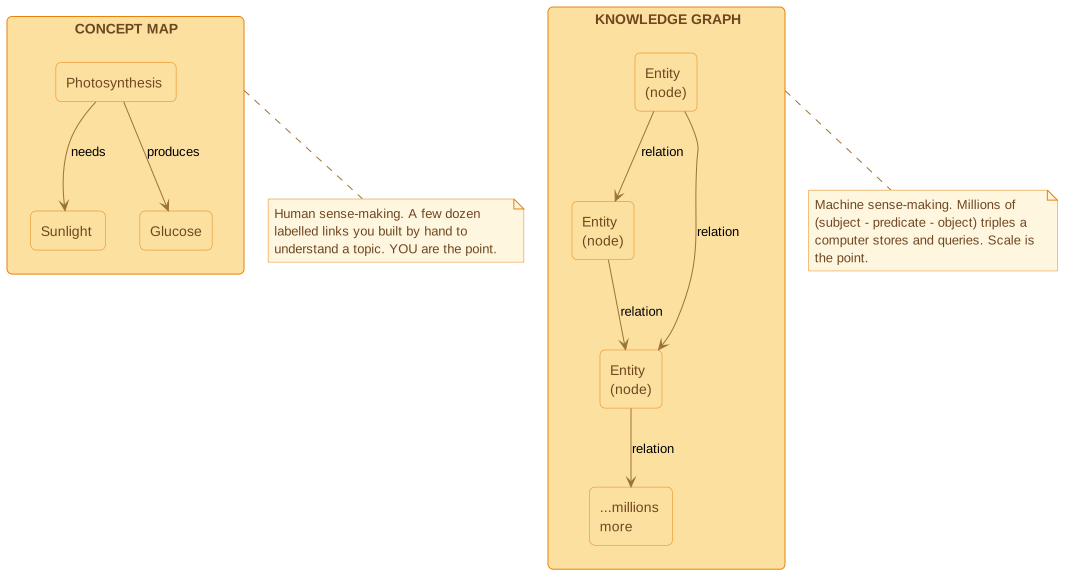
Same shape, different job. A concept map is meant to fit one mind; a knowledge graph is meant to outgrow every mind. When someone shows you a vast, beautiful graph of “everything connected to everything,” remember it’s a database diagram, not a study aid. Your map’s value comes from being small enough that you built every link.
Networked notes and personal knowledge graphs#
Here’s the genuinely new paradigm — the one the 2005 tools couldn’t do. Note apps like Obsidian, Logseq and the Zettelkasten method let you write notes as separate pages and join them with bidirectional links: link note A to note B, and B automatically knows about A. Do this as you read and study, and a graph view draws the emergent web of everything you’ve connected.
The effect is that your whole note collection slowly becomes one large, living concept map — not one you sat down to draw, but one that grows out of the links you make while thinking. It rewards the same habit this course is built on: when you write a note, ask what it connects to and name the connection. The connecting is the elaboration; the graph is just the visible trace of it.
A fair caution: a sprawling graph view is impressive to look at and easy to mistake for understanding. A thousand linked notes you can’t reproduce from memory is the illusion of competence at scale. The links earn their keep only if you forged them by thinking, and only if you go back and test yourself on them.
Diagrams as code#
A whole family of modern tools turns plain text into diagrams. Mermaid and PlantUML let you write a map’s structure as a few lines of markup and render it to a clean picture. Because the source is text, these maps live in version control: you can diff them, review changes, and regenerate the picture in seconds after an edit instead of nudging boxes by hand. For maps that change as your understanding does, that’s a real convenience — and it keeps the map next to the notes or code it describes. (Every diagram in this refreshed course is authored this way.)
One further trick worth a line: a PlantUML decision-flowchart isn’t only a picture of how a decision is made — it can be compiled into executable logic. The clearlogic tool turns such a flowchart into a deterministic classifier you can run, so the same diagram you drew to understand a process can also enact it.
One spec, three readers#
Writing a diagram as text has a quieter advantage worth naming, because it’s the reason the trick above works at all. A single text source can be read three different ways:
- A human sees the rendered picture and reads it the way people read anything visual — by scanning space and spotting shape and grouping at a glance.
- An AI reads the text directly. This isn’t just convenient: a model answers questions about a flowchart more reliably from its text source than from a rendered image of it, because the text spells out the connections the model would otherwise have to recover from pixels.
- A machine can sometimes even run it — the executable logic above, where the same diagram you drew to understand a process also enacts it.
Why does one source serve all three? Because the text and the picture carry the same information, but they suit different readers. This is an old observation from cognitive science — two representations can be informationally equivalent but not computationally equivalent: the same facts, but easier or harder to use depending on who’s doing the reading. Humans read space and perception, so the rendered picture lands faster; machines read text, so the markup is what they reason over best. Neither is “the real one” — they’re two views of a single underlying graph. (And when you put words and pictures in front of a person together, they tend to understand more than from either alone — the dual-coding idea this course keeps returning to.)
Maps into practice cards: the retrieval bridge#
This is the highest-value modern move, and it’s the one to take away if you take away nothing else from this page.
Throughout this course we’ve been honest that building a map is powerful because it makes you select, organize and integrate — but that drawing a map, on its own, is not the same as remembering it. The most reliable thing you can do with a finished map is turn it into retrieval practice, the single best-evidenced study method there is (see proven learning methods ).
A concept map converts into retrieval cards almost for free, because every labelled link is already a question:
- Each link becomes a prompt. A link “photosynthesis — produces → glucose” becomes the question “What does photosynthesis produce?” or, better, “How does photosynthesis relate to glucose?” Cover the map and answer from memory.
- Redraw the whole map from memory. Put the original away, draw it again blank, then compare. The gaps you couldn’t reproduce are exactly what you don’t yet know — far more honest feedback than the warm glow of looking at a finished map and feeling you understand it.
- Feed the gaps into spaced review. The links you missed go back into rotation, revisited after a gap, so they get the spacing that makes them stick.
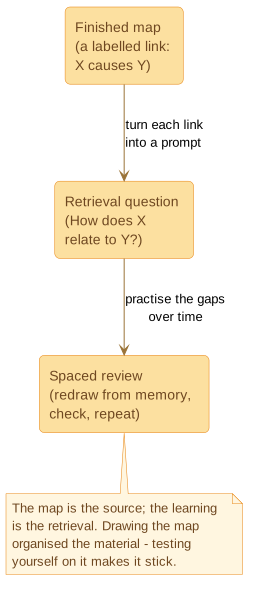
This is the bridge between this course and the proven methods : mapping is a superb source of retrieval-practice questions and a natural self-test when you redraw it from memory. A spaced-practice tool can hold those questions — Anki, Quizlet or RemNote, or a calibration-first practice app like MemGym — though the technique matters more than the app you pick. Build the map to organize the material; test yourself on it to learn it.
The through-line#
Step back and the pattern is clear. Between 2005 and now the tools changed enormously — from a pen and a sheet of paper to AI drafting, machine-scale graphs, linked-note systems and diagrams you write as code. The principle didn’t change at all. The value was never in the software, the layout, or the size of the graph. It’s in the active construction — you choosing what matters and naming how it connects — and the retrieval — you reproducing and testing it without the answer in front of you. Every new tool is worth exactly as much as it gets you doing those two things, and worth nothing, or less, when it does them for you.
Exercise#
Take a concept map you built earlier in this course. Pick three of its labelled links and turn each one into a retrieval question — phrase it as “How does X relate to Y?” so the answer is the linking phrase, not just a single word. Then put the map away and try to answer all three from memory. Note which one you couldn’t reproduce: that’s the link to study next, and the clearest evidence that drawing a map and knowing it are not the same thing.
If you want to go further, redraw the entire map from a blank page and compare it with the original. The difference is your study list.